
The Zombie Trend on TikTok and Reels
Your feed is full of people turning into zombies and being hugged anyway. This is the zombie trend: what the clips show, the versions people make with partners, friends and pets, and how to join it today with your own faces.
Free to sign up and set up your video · you only pay in credits when you render it
 A
APhoto 1 · The one who turns
Tap to add a clear photo
 B
BPhoto 2 · The survivor
Tap to add a clear photo
Clear, front-facing photo of an adult who agreed, one face each. No celebrities, minors or nudity. Rules
Happy ending
The person in photo 1 has turned into a zombie. The person in photo 2 aims a rifle, can't pull the trigger, drops it and hugs them, then the scene cuts to the two of you, human again, hugging: Wildflower meadow. No shot fired, no blood. A 12-second wordless film with soft piano, nothing to type.
By pressing “Make our zombie video” you confirm you are 18 or older, you have permission from everyone in the photos, and you agree to the Terms and Acceptable Use Policy.
This video: 17 credits · Free to sign up
Ready in about 4 minutes · Failed renders are refunded · Pack credits never expire
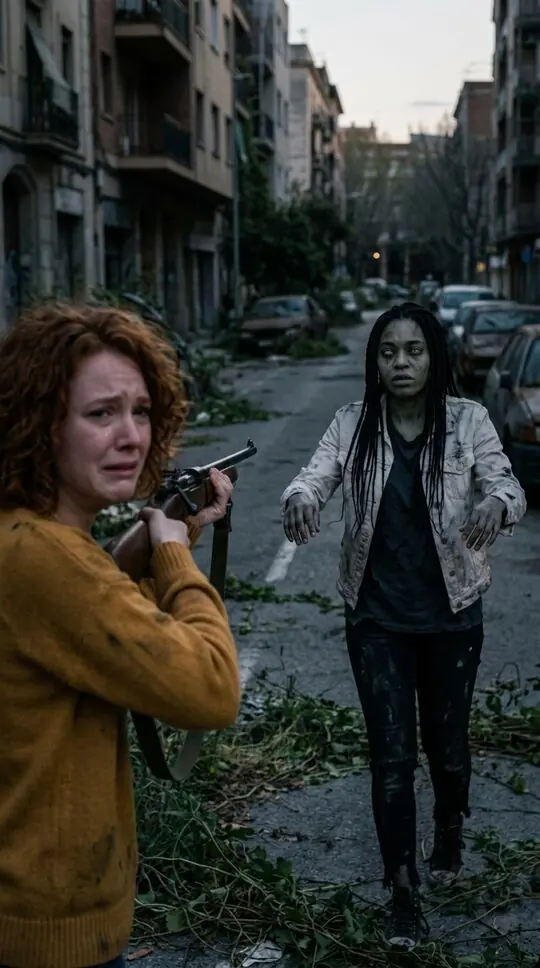
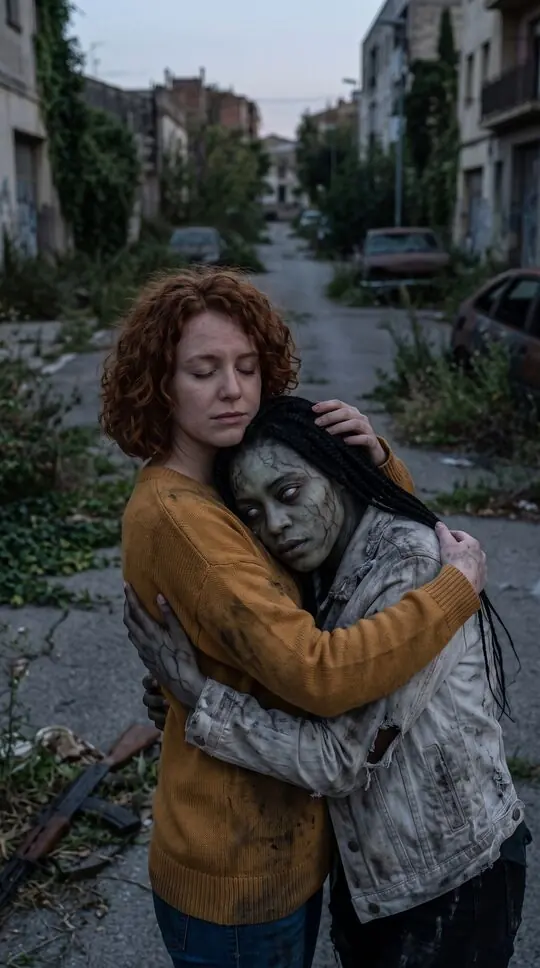
Zombie trend examples
Stills from sample scenes made with fictional characters. Your video uses your own photos.
At a glance
- A short clip: someone you love has turned, you can’t shoot, you hug them, then a cut to the two of you back to normal.
- Popular versions: couples, best friends, parents and grown-up kids, dogs and cats, Halloween.
- Post it vertical 9:16 with the trending sound added inside TikTok or Reels.
- FlicLoop makes the clip from two photos, no app or prompt needed.
How to do the zombie trend
- 1
Choose who turns
Your partner, your best friend, a parent, or your dog or cat. Pick the version that will make your followers stop scrolling.
- 2
Add two photos
One of the person (or pet) who turns and one of the survivor. Clear, front-facing photos work best.
- 3
Make it and post
About four minutes later, download the MP4, upload it to TikTok or Reels and add the trend sound there.
What the zombie trend clips show
The clips follow the same arc: an empty street after the end of the world, a loved one who has clearly turned, a survivor who cannot pull the trigger, a hug, and a sudden cut to warm footage of the two of them as their normal selves. The twist from horror to love is what makes people watch it twice.
The versions people make
Couples are the original, but best friends, mothers and adult daughters, and pets get just as many views. Around Halloween the trend picks up costumes, pumpkins and party endings.
See the pet versionSound and posting tips
Post vertical 9:16 so nothing is cropped. Add the trending sound inside the app rather than baking music into the video, keep the AI-generated label on, and only post people who agreed to it. A short caption like “even at the end of the world” fits the format.
The fastest way to make yours
Templates come and go, and AI video apps need long prompts. FlicLoop already has the story written: two photos, pick an ending, one button.
Make your zombie trend videoCaption ideas
Keep it short and let the twist land: “Even at the end of the world.” “I could never.” “Plot twist: love wins.” “POV: you had one job and you dropped the rifle.” “Still choosing you.” For a best-friend version: “Ride or die, literally.”
Tags that describe the clip
Use a few tags that say what the video is rather than a long list: #zombietrend, #aizombietrend, #zombielovestory, and one for who is in it, such as #couplegoals, #bestfriends or #dogsoftiktok.
Turn it into a series
One clip rarely ends the trend for an account. Post the couple version first, then reply to comments with the best-friend version, and finish with the pet version. Each one uses the same story, so followers recognise it instantly.
Make the pet versionPosting checklist
Settings that keep the clip looking right on TikTok, Reels and Shorts.
- Length that works
- About 10 to 15 seconds, so it loops
- Aspect ratio
- Vertical 9:16, nothing cropped on TikTok, Reels or Shorts
- Sound
- Add the trending sound inside the app, not in the file
- Label
- Turn on the AI-generated label when the app offers it
FlicLoop vs CapCut templates vs writing your own prompt
There are three common ways to make the AI zombie trend. Here is what each one gives you, so you can pick the one that fits.
FlicLoop is independent and not affiliated with CapCut, Kling, Google (Veo) or OpenAI (Sora). Other apps change their templates and prices often.
The zombie trend on TikTok FAQ
What is the zombie trend on TikTok?
A wave of short AI-made clips where someone turns into a zombie, the person with the rifle cannot shoot and hugs them instead, and the video cuts to the two of them back to normal.
What sound is used for the zombie trend?
There is no single official sound; creators pick whatever emotional track is trending that week in the app’s sound library. FlicLoop videos come with soft piano you can keep or mute when you add the trending sound.
How long should a zombie trend video be?
About 10 to 15 seconds, so the twist lands before people scroll and the clip loops. FlicLoop videos are 12 seconds.
Can I post the zombie trend on Instagram Reels and YouTube Shorts?
Yes. The video is vertical 9:16, which fits TikTok, Reels and Shorts without cropping.
Is the zombie trend the same as the AI zombie trend?
Yes. The clips are made with AI video tools, so people search for it both ways.
Do I have to label a zombie trend video as AI?
TikTok, Instagram and YouTube ask creators to disclose realistic AI-generated content, so turn on the AI-generated label when you post. FlicLoop videos also carry an AI-generated tag in the file data.
Can I do the zombie trend with my best friend or my dog?
Yes. Best friends and parents with adult kids use the people version; dogs and cats have their own pet version without a weapon.
More on the AI zombie trend
What is the AI zombie trend
Someone you love has turned. You raise the rifle, you cannot pull the trigger, you drop it and hold them, and the clip cuts to the two of you, human again. Here is where the AI zombie trend came from, why it works, and how to make your own version from two photos.
Learn moreHalloween zombie video
The zombie trend, Halloween edition. One of you has turned, the other can’t shoot, the hug wins, and the last shot cuts to the two of you, human again, at a cozy costume party with pumpkins and orange lights.
Learn moreZombie pet video
The pet version of the AI zombie trend. Your dog or cat has turned into a gentle little zombie, you kneel and open your arms, they walk into the hug, and the film cuts to the two of you playing in the sun. Two photos, about four minutes.
Learn moreReady to do the zombie trend?
Two photos, one button, about four minutes. Credits are returned automatically when a render fails.
Make our zombie video